The GiveCampus Gift API and the third-party connectors that use it provide a simple and modern approach to integrating with your CRM and the tools that help you innovate.
What is the GiveCampus API?
The GiveCampus API is a fast, secure means of transferring data from the GiveCampus platform to another location, often donor database or CRM (Customer Relationship Management software).
How is it used?
The GiveCampus API is most often used in one of two ways
Partner schools develop custom scripts to do the following:
- Obtain gift and other data to support gift entry
- Generate a list of events for a campus calendar or website
- Obtain event registration data for event preparation and entry into a CRM
- Generate a list of designations or designation groups in use to audit where and how they are visible to donors
- Make automated updates to the school list of designations or designation groups
- Import constituents and the wholistic "imported gifts" history necessary to power certain data-powered features
Third-party vendors have built API-enabled connectors that work with schools to transmit gift and constituent data from GiveCampus directly into their CRM. To date, the following solutions use the Gifts API.
- Omatic (Raiser's Edge, Blackbaud CRM, Salesforce)
- Zuri Group's Velocity (Blackbaud CRM)
- Brightvine Data Link (Blackbaud CRM)
- Kindsight Ascend (Salesforce)
- Affinaquest Advancement RM (Salesforce)
- Importacular (Raiser's Edge)
What can I access with the GiveCampus API?
-
Gifts, including the relevant constituent and recurring data, from Online Giving (GC Social Fundraising & GC Giving Forms)
- Retrieve a list of transactions and their data by timestamp, date range, and gift status
- Additional documentation below
-
Events and Registrations from GC Events
- Retrieve a list of events and their data by date range and status
- Retrieve a list of event registrations and their data by event id, date range, and registration status
- New API filters for event registrations
-
The Event Registrations endpoint (GET /api/event_registrations) now accepts two optional query parameters to help you retrieve specific registration records:
- event_ids – A comma-separated list of event IDs to return registrations only for those events. Use this filter to limit results to a specific set of events.
- end – A timestamp that caps results at an end time. When set, the endpoint returns registrations up to and including the specified timestamp instead of all records from a starting timestamp.
Both parameters are optional and can be used individually or together. Combine event_ids with your time-based filters to pull registrations for specific events within a defined time window.
The end parameter works with any supported time_field (such as completed_at, created_at, updated_at, captured_at, or deposited_at). When used with a specified time_field, the endpoint applies the end cap to that field.
These filters allow partners and schools running scheduled syncs or integrations to limit payload size and improve performance by targeting only the events and time window needed.
-
- Additional documentation below
-
Designations from Online Giving
- Retrieve a list of all designation in use and their data, including any designation group, campaign or giving form they are connected to
- Create new designations (individually or in bulk) using a list from your school
- Will deduplicate if all attributes match an existing designation
- Additional documentation below
-
Designation Groups from Online Giving
- Retrieve a list of all designation groups and their designations
- Bulk create designation groups for your school
- Additional documentation below
-
Recurring Subscriptions from Online Giving
- Retrieve a list of all recurring subscriptions and their data including installment data
- Retrieve the data from a specific recurring subscription using its subscription ID
- Additional documentation below
-
Form Fields from Online Giving
- Retrieve all standard and custom form fields in use by the school, along with information about the form or campaign where they are in use
- Additional documentation below
-
Constituents used in Online Giving, GC Wealth, GC Events, GC Outreach, GC Gift Officer, and GC Intelligence
- Retrieve a list of all constituents for your school in GiveCampus
- Search for a subset of constituents by IDs, emails, or last updated date
- Bulk create and modify constituents in GiveCampus including related fields such as addresses, activities, degrees, relationships, etc.
- Additional documentation below
-
Imported Gifts from Online Giving, GC Wealth and GC Events
- Retrieve a list of all imported gifts (including those imported via the School Dashboard Data Importer)
- Bulk create and modify historical gift histories imported from your CRM that donor status calculations and other data-powered tools
- Additional documentation below
-
Contact Reports for GC Gift OfficerCreate, Update, and Search for contact reports
- Additional documentation below
-
Opportunities for GC Gift Officer
- Create, Update, and Search for opportunity records
Can I send data to GiveCampus using the API?
Most API uses are based on a GET (retrieval) request, which does not allow writing or posting data to GiveCampus.
For certain data types — designations, designation groups, constituents, imported gifts, contact reports, opportunities, and assignments — you can POST (to write new data) or PUT (to modify existing data).
Check the relevant API call type documentation below to see what types of requests are possible.How do I access it?
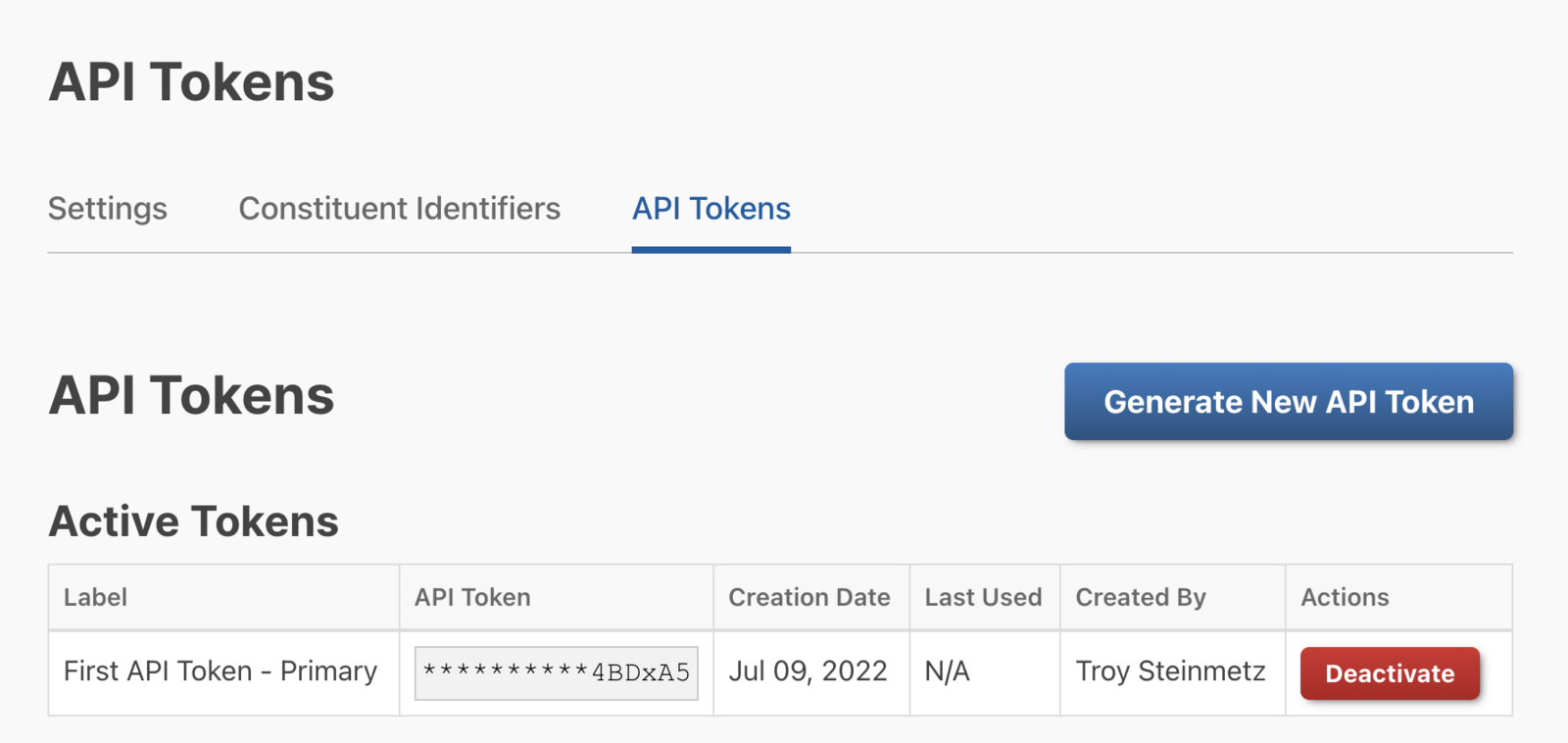
To generate API tokens used to access the API, go to School Dashboard > Integrations > API Keys
On that page, click the Generate New API Key button to create a new token.
What documentation can I give my technical team?
You can direct them to our API Documentation site, which includes:
- Request, result, and data models including field name, type, and description
- A testing tool (using your an API token from your school) to understand the request lifecycle and parameters
- Additional security information
Available documentation pages:
- Gifts API Documentation
- Designations v2 API Documentation
- Designation Groups v2 API Documentation
- Recurring Subscriptions API Documentation
- Form Fields API Documentation
- Events API Documentation
- Event Registrations API Documentation
- Constituents v2 API Documentation
- Imported Gifts API Documentation
- Contact Reports API Documentation
- Opportunities API Documentation
Comments
0 comments
Article is closed for comments.